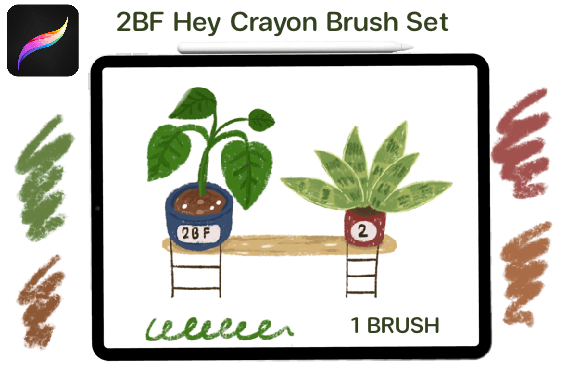
Hey Crayon: Digital Texture for Procreate
Digital art has evolved rapidly, moving from flat, vector-like precision to rich, textured surfaces that mimic traditional media. For many artists, the missing link in their digital workflow is the tactile feel of wax on paper. This is where Hey Crayon enters the conversation. It is not just a collection of digital tools; it is a bridge between the nostalgic comfort of childhood art supplies and the powerful, layer-based flexibility of modern tablet technology. By simulating the granular, slightly unpredictable nature of crayons, this brush set allows creators to inject warmth and organic imperfection into their work.
Understanding whether this tool fits your specific creative needs requires looking beyond the marketing images. It involves evaluating how different users—from casual hobbyists to professional illustrators—integrate textured brushes into their daily workflows. The value of Hey Crayon lies not just in the aesthetic it produces, but in how it changes the way you approach color blending, layering, and composition within the Procreate ecosystem.
What Is Hey Crayon?
At its core, Hey Crayon is a specialized digital brush set designed exclusively for the Procreate app on iPad. Unlike standard round or square brushes that produce uniform strokes, these tools are engineered to replicate the physical properties of wax crayons. This includes the characteristic graininess, the way pigment catches on the "tooth" of a digital paper texture, and the subtle variations in opacity that occur when pressure is applied differently.
The product is delivered as an instant download, specifically a file named brush.zip. This format is standard for Procreate assets, allowing for quick installation. However, the delivery method imposes a specific technical requirement: you must be on your iPad when you download the file. This is a crucial logistical detail. If you download the zip file to a desktop computer or a cloud drive without extracting it properly for iOS, the installation process can become cumbersome. The design intent is seamless integration, so ensuring you are working directly on your device streamlines the setup process significantly.
Why Different Creators Care About Texture
The appeal of Hey Crayon varies significantly depending on who is holding the Apple Pencil. While the visual output is the same, the utility differs across user groups.
For Beginners and Hobbyists
If you are new to digital art, the learning curve of software like Procreate can feel steep. Complex layer masks and blending modes may seem intimidating. Hey Crayon offers a gentle entry point because it behaves predictably. Most people have used crayons before; you understand intuitively that pressing harder creates darker, denser color, while lighter strokes leave more white space. This familiarity reduces cognitive load, allowing beginners to focus on form and color theory rather than fighting with software settings. For the hobbyist, the joy comes from the meditative quality of the stroke. It transforms screen time into a relaxing, tactile experience that feels less like "work" and more like play.
For Professional Illustrators and Designers
Experienced artists often struggle with the "sterile" look of digital art. Clients increasingly request work that feels handcrafted and authentic, avoiding the glossy perfection associated with vector graphics. For professionals, Hey Crayon is a efficiency tool. Instead of spending hours manually adding noise textures or scanning traditional drawings to overlay them, they can achieve a similar organic look directly in the sketching phase. This speed is vital for meeting tight deadlines. Furthermore, the commercial value lies in versatility. These brushes can be used for children’s book illustrations, editorial spots, or branding materials that require a friendly, approachable aesthetic.
For Educators and Content Creators
Teachers and bloggers often need to create engaging visuals quickly. A math worksheet, a science diagram, or a social media graphic can feel dry if it looks too corporate. Using Hey Crayon allows educators to create materials that feel welcoming and accessible, particularly for younger audiences. The imperfect lines suggest humanity and approachability. For marketers and entrepreneurs, this translates to brand personality. In a feed full of polished, high-gloss photos, a hand-drawn element created with textured brushes can stop the scroll by offering a moment of visual relief and authenticity.
Technical Requirements and Compatibility
Before purchasing or downloading, it is essential to verify that your hardware and software environment supports the tool. Hey Crayon is strictly compatible with Procreate for iPad. It will not function in Photoshop, Clip Studio Paint, Procreate Pocket (on iPhone), or any desktop-based painting program. This limitation is due to the proprietary brush engine Apple and Savage Interactive use for Procreate.
To use these brushes effectively, you need:
- An iPad: While many models support Procreate, the experience is optimal on an iPad Pro or iPad Air where the screen size allows for detailed work.
- Apple Pencil: Pressure sensitivity is key to unlocking the dynamic range of the crayon texture. Without a stylus that supports pressure, the brushes will not respond to varying touch intensity, limiting their expressive potential.
- Procreate App: Ensure your app is updated to the latest version to avoid compatibility issues with newer brush file formats.
The delivery process is instantaneous, but remember the critical step: download the brush.zip file directly on your iPad. Once downloaded, tapping the file should automatically open Procreate and import the brushes into your library. If you attempt to transfer the file from a computer via email or cloud storage, ensure you are opening it within the Procreate interface on the iPad, not just saving it to files.
Evaluating Fit for Your Workflow
How do you know if Hey Crayon is right for your current projects? Consider your priorities regarding ease of use, quality, and flexibility.
If your primary goal is speed and reliability, consider whether you already have a go-to texture brush. If you find yourself constantly adjusting opacity sliders to get a rough look, a dedicated crayon set can streamline that process. The presets are tuned to provide immediate results, reducing the time spent tweaking settings.
If you prioritize learning value and creativity, these brushes encourage experimentation. Because crayons do not blend as smoothly as oils or watercolors, they force you to think about color placement and hatching techniques. This constraint can actually boost creativity, pushing you to solve visual problems in new ways. For instance, instead of smoothing out a gradient, you might layer complementary colors to create visual vibration, a technique common in traditional crayon art.
For business owners and freelancers, the decision often comes down to client expectations. If your niche involves whimsical, nostalgic, or educational content, the investment pays for itself quickly by enhancing the perceived value of your deliverables. However, if your work is strictly technical, architectural, or hyper-realistic, these brushes may sit unused. It is important to align your toolset with your output.
Practical Application Examples
To visualize the utility, consider these scenarios:
- The Children’s Book Author: You are illustrating a story about a garden. Using Hey Crayon, you can sketch the flowers with loose, vibrant strokes that convey energy and growth. The texture adds depth to the petals without requiring complex shading techniques.
- The Social Media Manager: You need to highlight a quote on Instagram. Instead of using a standard font, you write the key words using the crayon brush. The imperfect edges make the post feel personal and urgent, increasing engagement.
- The Concept Artist: You are brainstorming character designs. The rough nature of the crayon allows for rapid iteration. You can scribble over previous ideas without worrying about clean lines, keeping the focus on silhouette and proportion.
In each case, the tool serves the intent. It is not about replacing other brushes, but adding a specific voice to your visual vocabulary. The granular texture provides a sense of history and materiality that flat digital colors often lack.
Making the Decision
Ultimately, Hey Crayon is a niche tool with broad appeal. It suits anyone who values the intersection of traditional aesthetics and digital convenience. Whether you are a marketer looking to humanize your brand, an educator trying to engage students, or an artist seeking to break out of digital rigidity, the value proposition is clear. It offers a low-barrier way to introduce organic texture into your work.
Remember to check your device compatibility before downloading. Ensure you are on your iPad, have Procreate installed, and are ready to import the brush.zip file immediately. By aligning the tool with your specific creative goals, you can transform simple digital strokes into expressive, textured art that resonates with your audience.