Little Stars Procreate Brush Stamp: A Practical Evaluation for Digital Artists
Digital illustration offers an expansive toolkit, yet the choice of brushes often dictates the efficiency and aesthetic quality of a workflow. For artists working within the iPad ecosystem, specialized stamp brushes can significantly reduce repetitive tasks while adding consistent decorative elements to compositions. The Little Stars Procreate Brush Stamp set represents one such tool, designed specifically to streamline the process of incorporating celestial motifs into digital artwork. This article evaluates the utility, installation process, and practical applications of this brush set to help creators determine if it aligns with their artistic requirements.
Understanding the Little Stars Stamp Brush Set
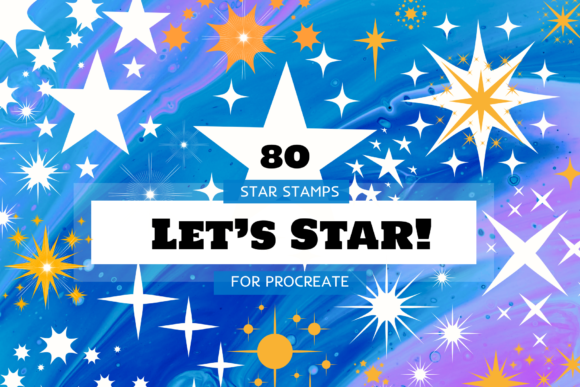
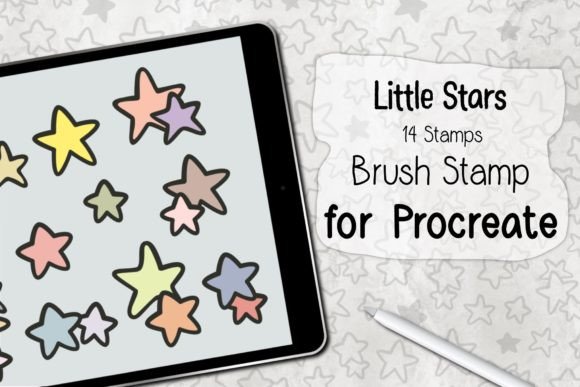
The Little Stars collection is a niche digital asset comprising 14 distinct stamp brushes. Unlike standard painting brushes that rely on continuous stroke dynamics to create texture, stamp brushes place a pre-defined shape onto the canvas with each tap or press. This particular set focuses exclusively on star shapes, varying in style, complexity, and form. The primary value proposition here is consistency and speed. Rather than manually drawing individual stars—a task that can lead to irregularities in shape and size—artists can deploy these stamps to ensure uniformity across their illustrations.
The package is delivered as a ZIP file containing a single .brushset file. This format is native to Procreate, ensuring that all 14 brushes are installed simultaneously rather than individually. The simplicity of the distribution method reflects the straightforward nature of the tool: it is a functional utility rather than a complex software suite. Users should note that the set requires Procreate Version 5.0 or higher, indicating that it leverages features available in more recent updates of the application.
Technical Requirements and Compatibility
Before acquiring or downloading the Little Stars Procreate Brush Stamp, it is crucial to verify hardware and software compatibility. The tool is strictly limited to the Apple iPad environment. Specifically, it requires an iPad Pro or a standard iPad model capable of running the Procreate application. Furthermore, optimal usage demands an Apple Pencil or a compatible, pressure-sensitive stylus. While basic tapping may work with finger input, the nuanced control offered by a stylus is essential for adjusting the size and opacity of the stamps dynamically.
It is important to emphasize that these brushes will ONLY work in the Procreate application. They are not compatible with Adobe Fresco, Clip Studio Paint, Photoshop, or any other digital art software. This limitation is significant for artists who maintain a cross-platform workflow. If you primarily create on desktop software or switch between multiple apps, this asset will have limited utility. However, for dedicated Procreate users, the integration is seamless.
Installation and Workflow Integration
The installation process for the Little Stars set is designed to be user-friendly, even for those with minimal technical experience. Upon downloading the ZIP file, users must first unzip or extract the contents to access the .brushset file. The subsequent steps are straightforward:
- Locate the extracted
.brushsetfile on your iPad. - Select the "Open In" option and choose Procreate from the list of applications.
- Procreate will automatically import the brushes into the Brush Library.
- Access the new stamps via the Brush Library, typically found in a newly created folder or at the end of your existing brush list.
This automatic installation eliminates the need for manual configuration or complex file path adjustments. Once installed, the brushes behave like any other tool in Procreate. Artists can adjust size, opacity, and flow using the standard sliders, allowing for varied visual effects despite the static nature of the stamp shapes.
Practical Applications and Benefits
The primary benefit of the Little Stars Procreate Brush Stamp lies in its ability to enhance backgrounds and decorative elements efficiently. Consider scenarios such as creating children’s book illustrations, greeting cards, or whimsical character designs. In these contexts, stars often serve as background noise or magical accents. Manually drawing dozens of stars can be time-consuming and may result in inconsistent aesthetics. Using a stamp brush ensures that every star maintains a cohesive style, contributing to a polished final look.
Additionally, the variety within the 14-brush set allows for layering and depth. By combining different star shapes—some simple and geometric, others more ornate—artists can create complex celestial fields without cluttering their layer stack with excessive manual drawings. This efficiency is particularly valuable for commercial artists working under tight deadlines, where speed and consistency are paramount.
Tradeoffs and Limitations
While efficient, stamp brushes come with inherent tradeoffs. The most notable limitation is the lack of organic variation. Because each stamp is a predefined shape, repeated use can lead to a patterned or repetitive appearance if not managed carefully. Skilled artists must mitigate this by rotating the canvas, varying the opacity, and mixing different star types from the set to break up visual monotony.
Furthermore, the reliance on Procreate means that files created with these brushes are not easily editable in other programs. If a project needs to be transferred to Photoshop for final compositing, the brush strokes will rasterize, meaning the individual star shapes cannot be easily resized or modified without losing quality. This necessitates a finalized approach within Procreate before exporting assets.
Is This Brush Set Right for You?
Deciding whether to incorporate the Little Stars set into your toolkit depends on your specific artistic goals. This tool is a strong fit for:
- Illustrators specializing in whimsical or celestial themes: If stars are a recurring motif in your work, this set saves considerable time.
- Beginners seeking consistency: New artists who struggle with drawing symmetrical shapes can use these stamps to achieve professional-looking results quickly.
- Commercial designers: Those creating patterns for textiles, wallpapers, or stationery will benefit from the uniformity and speed of stamp brushes.
Conversely, alternatives may be worth considering if:
- You prioritize organic, hand-drawn textures: If your style relies on imperfect, expressive lines, pre-made stamps may feel too rigid or artificial.
- You work across multiple platforms: If you frequently switch between Procreate and desktop software, investing in vector-based star assets or brushes compatible with multiple programs might offer greater flexibility.
- You require extensive customization: While you can adjust size and opacity, you cannot alter the fundamental shape of the stamp. If you need unique star variations not included in the 14 provided options, this set may feel limiting.
Final Considerations for Digital Artists
The Little Stars Procreate Brush Stamp serves as a specialized tool rather than a comprehensive solution. Its value is derived from its ability to solve a specific problem: the efficient creation of consistent celestial elements. For artists who find themselves repeatedly drawing stars, this set offers a logical optimization of their workflow. However, it is essential to approach stamp brushes with an understanding of their limitations regarding variation and platform exclusivity.
When evaluating this tool, consider your current project pipeline. If you are deeply embedded in the Procreate ecosystem and frequently incorporate decorative backgrounds, the Little Stars set provides a practical, low-friction addition to your library. By integrating these stamps thoughtfully—mixing them with hand-drawn elements and varying their application—you can enhance the visual appeal of your work while maintaining operational efficiency. Ultimately, the decision rests on whether the time saved outweighs the loss of manual control, a balance that each artist must assess based on their unique stylistic preferences and professional demands.