Leaves Stamps for Procreate: Foliage Sha Guide
Digital illustration offers endless possibilities, yet sometimes the most time-consuming part of creating a natural scene is drawing repetitive elements like foliage. This is where Leaves Stamps for Procreate. Foliage Sha becomes an invaluable tool for artists of all skill levels. Whether you are a professional illustrator working on a children’s book, a hobbyist designing seasonal greeting cards, or a marketer creating social media content, this brush set streamlines your workflow significantly. By providing pre-designed, high-quality leaf shapes, it allows you to focus on composition and color rather than getting bogged down in the minutiae of drawing every single vein and edge.
What Is Inside the Foliage Collection?
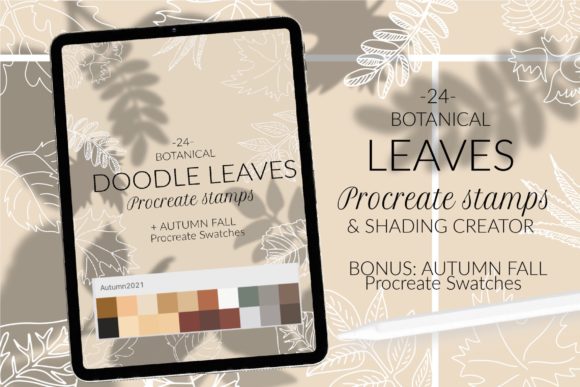
The core appeal of this package lies in its diversity and attention to botanical detail. The set includes Foliage Procreate stamps that cover a wide spectrum of common tree species. You are not limited to generic leaf shapes; instead, you get specific, recognizable forms including maple, rowan, birch, elm, ash, chestnut, hazelnut, linden, oak, willow, and poplar. Specifically, the collection features two variations of maple leaves, ensuring you have options for different angles and styles.
In total, you receive 24 .brush files. This number accounts for the variety of leaf types and their orientations, giving you the flexibility to create dense, realistic canopies or sparse, windy scenes. Alongside the brushes, the package includes 1 color palette with autumn colors for Procreate. This inclusion is particularly thoughtful, as selecting the right hues for fall foliage can be challenging. The provided .swatches file offers a curated selection of warm oranges, deep reds, golden yellows, and earthy browns, allowing you to start painting immediately without spending hours mixing colors.
Why Use Leaf Stamps Instead of Drawing Freehand?
For beginners, drawing realistic leaves from scratch requires a steady hand and a good understanding of botanical structure. For professionals, drawing hundreds of leaves for a background is simply inefficient. Using Leaves Stamps for Procreate. Foliage Sha bridges this gap. It democratizes high-quality nature illustration, enabling users to create complex scenes quickly.
The primary benefit is speed. What might take hours to draw manually can be achieved in minutes using stamps. However, speed does not mean sacrificing quality. Each stamp is designed with clean edges and natural proportions. This consistency helps maintain a cohesive look throughout your artwork. Furthermore, because these are digital brushes, you can easily resize, rotate, and change the opacity of each leaf, allowing for infinite variation from a single stamp.
Creative and Commercial Applications
The versatility of this brush set extends across various creative fields. Here are some practical ways to integrate these tools into your projects:
- Seasonal Graphic Design: Create eye-catching autumn-themed posters, flyers, or social media posts for small businesses. The included autumn color palette ensures your designs feel warm and inviting.
- Digital Scrapbooking: Enhance digital journals or planners with realistic foliage borders and accents. The variety of leaf types, from the delicate birch to the robust oak, adds texture and interest.
- Children’s Book Illustration: Populate forest scenes quickly. The whimsical yet accurate shapes work well for both realistic and stylized art styles.
- Pattern Design: Use the stamps to create seamless patterns for textiles, wrapping paper, or website backgrounds. By rotating and overlapping the leaves, you can generate complex, organic repeats.
- Educational Materials: Teachers and educators can use these stamps to create engaging biology worksheets or presentations about tree identification and seasonal changes.
Important Considerations Before You Start
While the Foliage Procreate stamps are designed for ease of use, there are technical details you must consider to ensure a smooth experience. The compatibility of your device and software version plays a crucial role in how you install and use these brushes.
The package is optimized for modern versions of Procreate but includes provisions for older setups. You will receive one main brushset file, which is the easiest way to install all brushes at once. However, if you are using Procreate 4.0 or earlier, or if you have an older iPad model that struggles with newer file formats, the brushset file may not work directly. In this case, do not worry. The package also includes individual .brush files.
If you fall into this category, you will need to save each .brush file to your “Import” folder. A helpful tip is to rename them systematically, such as “NAME collection of brush,” to keep your library organized. This manual method ensures that even users with legacy hardware can access the full range of leaves, from willow to hazelnut.
How to Install Your Procreate Brushes
Installing your new tools is straightforward, but the method depends on your preferred workflow and device capabilities. Below are the two most common methods for getting your Leaves Stamps for Procreate. Foliage Sha up and running.
Method 1: Using the Share Menu (Recommended for Most Users)
- Download the folder containing the brushset or individual .brush files to a accessible location on your iPad, such as the Files app.
- Open the folder and locate the .brushset or specific .brush files you wish to install.
- Tap and hold the file with your finger or Apple Pencil to bring up the context menu.
- Select Share from the options presented.
- Look for the option Open in Procreate. If you do not see it immediately, click on More.
- Scroll through the list of apps, find Procreate, and tap it. The brushes will automatically import into your current brush library.
- Open your project in Procreate and click on the brush icon at the top right corner to access your new foliage stamps.
Method 2: Importing via Procreate Interface
If the share method does not work for you, or if you prefer managing imports within the app, follow these steps:
- Open Procreate and navigate to the Brush Library by tapping the brush icon.
- Click on the plus sign (+) to create a new collection, or select an existing one where you want to store the leaves.
- Tap on Import.
- Navigate to the folder where you downloaded the brushes. Select the desired .brush files or the entire set.
- Confirm the addition. The brushes will now appear in your selected collection, ready for use.
Maximizing the Potential of Your Foliage Stamps
Once installed, experimenting with the settings can yield even more realistic results. Do not just stamp the leaves in a straight line. Vary the size, rotation, and opacity to mimic how leaves naturally fall and cluster. Use the included autumn color palette to layer different shades within a single tree, creating depth and visual interest. For instance, use darker reds for the shadows and bright yellows for the highlights on an oak leaf.
Remember that these stamps are tools to aid your creativity, not replace it. Combine the Leaves Stamps for Procreate. Foliage Sha with standard painting brushes to add stems, branches, and background textures. This hybrid approach results in artwork that feels both efficient and hand-crafted. Whether you are depicting a gentle breeze through the poplars or a heavy drop of chestnut leaves, this set provides the foundational elements you need to bring your digital nature scenes to life.