Mastering the Evergreen Color Palette: A Guide to Digital Holiday Art in Procreate
The holiday season brings with it a distinct visual language, one dominated by rich textures and deep, comforting hues. At the heart of this aesthetic lies the evergreen color palette. For digital artists, understanding how to leverage these tones can transform simple sketches into evocative pieces of seasonal art. Whether you are designing greeting cards, creating social media decorations, or producing wall art, mastering the nuances of green, blue, dark green, and light green is essential. This guide explores the significance of the evergreen palette and provides a practical walkthrough for using specialized Procreate brushes and swatches to elevate your digital drawing experience on the iPad.
The Significance of the Evergreen Aesthetic
Why do we associate deep greens and cool blues with the winter holidays? The answer lies in both nature and tradition. The evergreen tree, resilient against the cold, has long been a symbol of life and continuity during the darkest days of the year. In design, this translates to a palette that feels both grounding and festive. However, the "evergreen" look is not monolithic. It is a complex interplay of shades that mimic the natural world.
A successful Christmas tree illustration requires more than a single shade of green. It demands depth. By incorporating dark green for shadows and light green for highlights where the light hits the needles, artists create volume. Adding touches of blue can simulate the frosty atmosphere of winter or the cool tone of shaded branches. This variety is what makes digital art feel organic rather than flat. When you utilize a curated set of color swatches, you save time and ensure color harmony throughout your piece.
Practical Applications in Modern Creativity
In today’s digital-first world, the demand for high-quality seasonal content is higher than ever. Businesses need eye-catching social media posts; individuals want personalized digital greeting cards; and creators are constantly seeking fresh content for online marketplaces. The evergreen color palette is versatile enough to fit all these needs.
- Greeting Cards: Use soft light greens and whites for a gentle, inviting feel.
- Wall Art and Posters: Lean into dark greens and deep blues for a sophisticated, modern look.
- Social Media Decoration: Combine vibrant greens with bright accents for high-impact visuals.
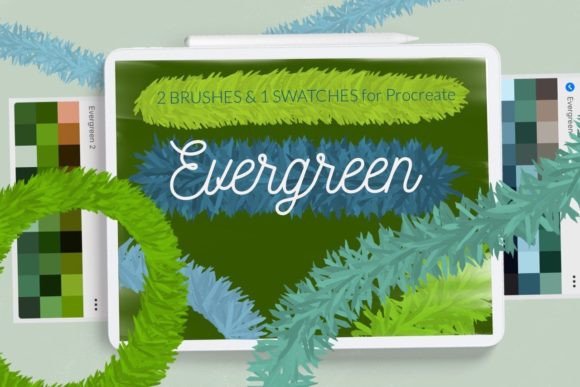
By using specialized tools like the Evergreen and Christmas tree wreath brushes, artists can streamline their workflow. These tools are designed specifically for the iPad Procreate app, allowing for intuitive creation of textured foliage and wreaths without the need for manual, repetitive detailing.
Enhancing Your Workflow with Procreate Tools
For iPad users, Procreate has become the industry standard for digital illustration. Its power lies in its customization. The inclusion of specific brushes and swatches tailored for holiday themes allows artists to focus on composition and creativity rather than technical setup. The package described here includes two distinct color swatches featuring the core evergreen palette and specialized brushes for creating realistic wreaths and trees.
Understanding how to install these assets is crucial. While Procreate has updated its interface over the years, many users may still be operating on older versions or prefer traditional installation methods. Below is a comprehensive guide to ensuring your tools are ready for use.
How to Install Procreate Brushes and Swatches
Installing custom content can sometimes seem daunting, but it is a straightforward process. Whether you are using the latest version of Procreate or an older iteration (version 4.0 or earlier), the goal is to get your .brush and .brushset files into the application. Follow these steps to integrate your new evergreen tools seamlessly.
-
Download the Files: Ensure you have downloaded the folder containing the
.brushfiles to a accessible location on your iPad, such as the "Files" app. -
Locate the Brush File: Open the folder on your iPad and identify the specific
.brushfiles you wish to install. - Initiate the Share Menu: Tap and hold the file with your finger or Apple Pencil. A context menu will appear.
- Select Share: Choose the "Share" option from the menu. This opens the iOS sharing sheet.
- Find Procreate: Look for the option "Open in Procreate." If this option is missing, click on "More" to see additional apps.
- Import: Scroll through the list, find "Open in Procreate," and click on it. The brush should automatically import into your current brush library.
- Verify Installation: Open your project in Procreate and click on the brush icon at the top right corner. Your new brush should be visible in the selected set.
Alternatively, if you prefer managing your libraries directly within the app, you can use the internal import feature:
- Open Procreate and navigate to the Brush Library.
- Click on "New Collection" or select an existing collection where you want the brush to reside.
- Select "Import" and navigate to the folder containing your downloaded brush.
- Choose the file, and it will be added to your Procreate library immediately.
For the color swatches, the process is similarly simple. Once imported, you can find your new palette at the bottom of the screen in the swatches library. This ensures that your evergreen greens, blues, and highlights are always just a tap away, maintaining consistency across multiple projects.
Building a Broader Understanding of Digital Palettes
While the immediate goal may be to create a Christmas tree or wreath, the skills learned here extend far beyond holiday art. Understanding how to curate and use color palettes is a fundamental skill in graphic design. The evergreen palette teaches us about contrast and temperature. The juxtaposition of warm lights against cool, dark green backgrounds is a classic technique that applies to landscape painting, interior design visualization, and even branding.
Moreover, familiarity with file formats like .brush and .brushset empowers artists to explore the vast ecosystem of Procreate resources. There are thousands of community-created tools available, each designed to solve specific artistic challenges. By mastering the installation process, you unlock the ability to customize your digital studio to fit your unique style.
Common Misunderstandings About Digital Brushes
One common assumption is that using pre-made brushes "cheats" the artistic process. In reality, brushes are simply tools, much like a specific type of paintbrush or pencil in traditional media. They do not create the art for you; they facilitate the expression of your vision. A Christmas tree brush might lay down the basic texture of needles, but the artist must still determine the shape, lighting, color variation, and composition. The tool enhances efficiency, allowing the creator to focus on the creative decisions that truly matter.
Another misconception is that color swatches are rigid rules. While the provided evergreen color palette offers a harmonious starting point, artists are encouraged to experiment. Adjusting the saturation or brightness of these base colors can help match the specific mood of your piece, whether it is a bright, cheerful morning scene or a moody, midnight winter landscape.
Conclusion
The evergreen color palette is more than just a seasonal trend; it is a timeless combination of hues that evoke warmth, nature, and celebration. By integrating specialized Procreate brushes and swatches into your workflow, you can enhance the quality and efficiency of your digital art. From greeting cards to social media content, these tools provide the foundation for professional-looking results.
Remember, the key to mastering digital art lies in both technical proficiency and creative exploration. Take the time to understand how your tools work, from installing .brush files to manipulating color swatches. As you become comfortable with these processes, you will find that your ability to translate your creative ideas into digital reality grows exponentially. So, open your iPad, import your new evergreen tools, and let your creativity flourish this holiday season and beyond. © Let s Art ♡.