USA Map Stamps for Procreate: A Practical Guide to Digital Cartography Tools
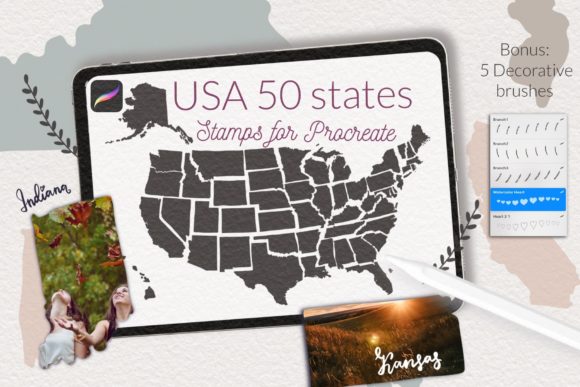
Digital illustration has transformed how designers, educators, and hobbyists approach map creation. For users of the iPad-based application Procreate, specialized tools can significantly streamline the workflow. One such resource is the USA Map Stamps for Procreate, a digital brush set designed to simplify the process of incorporating United States geography into artistic and educational projects. This kit typically includes fifty-one distinct stamps: one representing the entire country and fifty individual stamps for each state. Understanding the functionality, limitations, and ideal use cases for this tool is essential for determining whether it aligns with your specific creative or instructional goals.
Understanding the Tool and Its Components
The core value of this product lies in its convenience. Rather than manually tracing state borders or searching for vector files to import, users can access pre-made shapes directly within the Procreate interface. The set is structured as a single brush file containing fifty-one brushes. This organization allows for quick selection and placement of geographic elements onto the canvas. The inclusion of both the full country outline and individual states provides flexibility, enabling users to create comprehensive national maps or focus on specific regional details.
It is important to note that this tool is exclusively compatible with Procreate on the iPad. It does not function on other platforms such as Android tablets, desktop software like Photoshop, or web-based design tools. Furthermore, compatibility depends on the software version. Users running Procreate version 4.0 or earlier may encounter issues with the standard brushset file format. In such cases, alternative file arrangements, such as individual .brush files, may be required, often necessitating direct communication with the creator for customization.
Primary Use Cases and Benefits
The versatility of the USA States and USA country and states kit for Procreate makes it suitable for a wide range of applications. Below are several scenarios where this tool offers distinct advantages:
- Personalized Travel Maps: Many individuals enjoy documenting their journeys visually. These stamps facilitate the creation of unique USA travel collages or family trip maps. Users can highlight visited states, add icons, or annotate locations without needing advanced cartographic skills.
- Educational Materials: Teachers and homeschooling parents can leverage these stamps to develop engaging learning resources. They are effective for creating worksheets, puzzles, and coloring pages for kindergarten and elementary students. The clear outlines help children identify state shapes and understand geographical relationships.
- Sales and Business Tracking: For professionals managing regional data, these stamps can serve as visual trackers. Sales teams might use them to color-code territories or monitor performance metrics across different states, providing a clear, at-a-glance overview of business activity.
- Craft and Design Projects: Designers using Cricut or other cutting machines can incorporate these digital stamps into their workflows. After designing in Procreate, the images can be exported and used for physical crafts, posters, or personalized gifts.
Technical Considerations and Installation
Before purchasing or downloading, users should assess their technical setup. The installation process varies depending on the device and software version. For most modern users, importing the .brushset file is straightforward. However, those with older iPads or outdated software versions must follow a more manual procedure.
If you are using Procreate version 4.0 or earlier, the standard brushset may not load correctly. In this situation, you may need to request individual .brush files from the creator. The installation process for individual files involves downloading the folder to your iPad, opening the specific .brush file, tapping and holding with your finger or Apple Pencil, selecting "Share," and then choosing "Open in Procreate." If the option is not immediately visible, selecting "More" will reveal it. This extra step highlights the importance of keeping software updated to ensure seamless integration of digital assets.
Evaluating Fit: When to Choose This Tool
Deciding whether to invest time in this brush set depends on your specific needs. It is a strong fit if you prioritize speed and ease of use over absolute geographical precision. For social media graphics, classroom handouts, or personal art projects, the stylized nature of stamp brushes is often sufficient and aesthetically pleasing. The ability to quickly layer states and customize colors within Procreate’s robust environment adds significant value for digital artists.
Additionally, if you already work within the Apple ecosystem and rely on Procreate for your primary design tasks, integrating a native brush set reduces the friction of switching between applications. You can draw, color, and annotate without exporting or importing files from external sources, maintaining a fluid creative workflow.
When to Consider Alternatives
While convenient, this tool has limitations that may make alternatives more suitable for certain users. If your project requires high-precision cartography, such as detailed topographical maps or legally accurate boundary lines for official publications, a dedicated GIS (Geographic Information System) software or professional vector mapping tool would be more appropriate. Stamp brushes are generally simplified representations and may not adhere to strict geopolitical accuracy.
Furthermore, if you do not own an iPad or prefer working on a desktop computer, this tool is not viable. In such cases, exploring SVG vector packs compatible with Adobe Illustrator or Inkscape would provide greater flexibility and scalability. Similarly, users who require frequent updates to map boundaries due to political changes might find static brush sets less adaptable than dynamic online mapping services.
Making an Informed Decision
To determine if the USA Map Stamps for Procreate aligns with your goals, consider the following factors:
- Project Scope: Are you creating casual, artistic, or educational content? If yes, this tool is likely sufficient. For technical or commercial mapping, seek professional alternatives.
- Software Compatibility: Verify your Procreate version. Ensure you are comfortable with the installation process, especially if using an older device.
- Design Style: Assess whether the stylized look of brush stamps matches your aesthetic. If you require realistic textures or complex data visualization, additional plugins or manual drawing techniques may be necessary.
In conclusion, the USA States and country kit offers a practical solution for iPad users looking to integrate American geography into their digital creations. By understanding its capabilities and constraints, you can effectively leverage this resource to enhance your design projects, educational materials, or personal tracking systems. Always weigh the convenience of pre-made stamps against the precision requirements of your specific task to ensure the best outcome.