Mastering Avian Ink: A Practical Guide to the Bird Tattoo Stencil Line Art Brush Stamp
The intersection of digital efficiency and traditional tattoo artistry has created a new category of tools for modern artists. Among these, the Bird Tattoo Stencil Line Art Brush Stamp stands out as a specialized resource designed to streamline the creation of avian motifs. For tattoo artists and illustrators working within the Procreate ecosystem on iPad, this tool offers a distinct approach to generating consistent, high-quality line work. However, integrating any digital asset into a professional workflow requires a clear understanding of its capabilities, limitations, and appropriate use cases. This analysis explores how this specific brush stamp functions, where it excels, and how it compares to alternative methods of creating tattoo stencils.
Understanding the Tool and Its Workflow
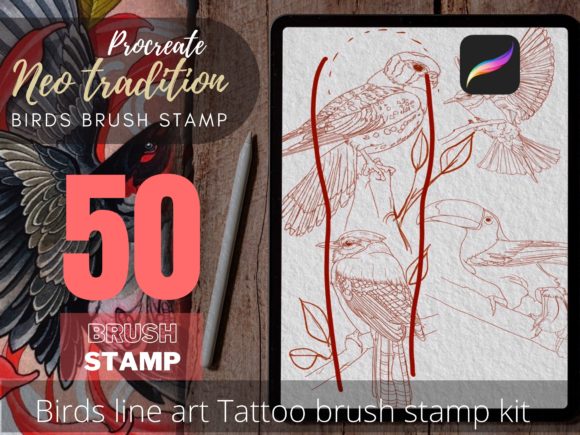
At its core, the Bird Tattoo Stencil Line Art Brush Stamp is a digital asset pack containing fifty unique line art designs focused on bird imagery. Unlike standard brushes that paint continuous strokes, a stamp brush allows the user to place pre-defined shapes onto the canvas with a single tap or drag. This functionality is particularly valuable in tattoo design, where symmetry, proportion, and clean lines are critical for successful stencil transfer.
To utilize this resource effectively, specific technical requirements must be met. The tool is optimized for the iPad Pro paired with an Apple Pencil or a comparable stylus that supports pressure sensitivity. It requires Procreate Version 5.0 or higher. This dependency on Apple’s hardware and software ecosystem means that artists using Android tablets, desktop-based software like Photoshop or Illustrator, or older iPad models will not be able to integrate this specific tool into their workflow. For those already invested in the Procreate environment, however, the integration is seamless, allowing for immediate experimentation with the included fifty bird line art variations.
What Is Included and How It Functions
The package includes fifty distinct bird line art stamps. These are not merely static images but functional brushes that can be scaled, rotated, and adjusted for opacity within the app. This flexibility allows artists to customize the size and placement of the bird motif to fit specific body contours, such as the curvature of a forearm or the expanse of a back piece. The "stencil" nature of the line art implies that the designs are created with bold, clear outlines intended to translate well into thermal stencil paper or direct digital projection systems used in modern tattoo studios.
It is important to note the licensing restrictions associated with this product. The download becomes available immediately after payment processing, but the usage rights are strictly defined. Users are prohibited from converting the illustrations into vector graphics for resale, sharing, or redistributing the files to third parties. Furthermore, modifying the digital brushes to create new brushes for sale or converting them for use in other software providers is not permitted. These restrictions protect the intellectual property of Boyd Tattoo Worker Studio while allowing individual artists to use the stamps for creating unique, client-specific tattoo designs.
Comparing Digital Stamps to Traditional Design Methods
When evaluating the Bird Tattoo Stencil Line Art Brush Stamp, it is helpful to compare it against traditional hand-drawing methods and other digital approaches. Each method offers different tradeoffs regarding time, customization, and artistic expression.
- Hand-Drawn Sketches: Traditional sketching offers unlimited creative freedom. An artist can draw a bird in any pose, style, or level of detail. However, this process is time-consuming and requires a high level of drawing proficiency to ensure anatomical accuracy and symmetrical balance. For artists who struggle with consistent line weight or proportion, hand-drawing can lead to longer consultation times and potential client dissatisfaction if revisions are needed.
- Vector-Based Design: Using software like Adobe Illustrator allows for infinite scalability and precise geometric control. Vector lines are clean and ideal for machine-based stencil cutting. However, the learning curve for vector software is steep, and the workflow often lacks the organic, tactile feel that many tattoo artists prefer. Additionally, creating complex organic shapes like feathers can be more labor-intensive in vector formats compared to raster-based painting apps.
- Digital Stamp Brushes: The Bird Tattoo Stencil Line Art Brush Stamp bridges the gap between speed and quality. It provides a foundational structure that ensures anatomical correctness and clean lines instantly. This allows the artist to focus on composition, placement, and adding personalized details rather than spending hours constructing the base image. The tradeoff is a reduced level of initial uniqueness, as the base shape is pre-designed. However, the ability to modify the surrounding elements and combine multiple stamps mitigates this limitation.
Evaluating Fit: When to Use This Resource
Determining whether this tool is the right choice depends largely on the artist’s style, volume of work, and technical setup. The Bird Tattoo Stencil Line Art Brush Stamp is particularly well-suited for several scenarios:
- High-Volume Studios: For artists who frequently receive requests for bird tattoos, having a library of fifty pre-vetted designs significantly reduces consultation and design time. This efficiency can lead to higher throughput without sacrificing quality.
- Artists Refining Their Style: Junior artists or those transitioning into tattooing may find value in using professional-grade line art as a reference. Studying the line weights and structures in the stamps can improve their own hand-drawing skills over time.
- Flash Sheet Creation: Creating flash sheets (pre-designed tattoos available for immediate selection) is faster with stamp brushes. Artists can rapidly generate a variety of bird options, arrange them aesthetically, and print them for display.
Conversely, this tool may not be the best fit for artists who specialize in hyper-realistic portraits or highly abstract, freeform styles. If an artist’s brand is built entirely on one-of-a-kind, hand-sketched originals, relying on stamp brushes might conflict with their artistic identity. Additionally, artists who do not use an iPad Pro or Procreate will need to look for alternative resources compatible with their preferred hardware and software.
Practical Considerations and Limitations
While the convenience of digital stamps is evident, there are practical limitations to consider. The primary constraint is the fixed nature of the base designs. Although the stamps can be resized and rotated, the fundamental pose and structure of each bird are predetermined. Artists seeking a specific, unusual angle or a hybrid creature may find the existing fifty options limiting. In such cases, the stamp serves best as a starting point or reference layer, which the artist then traces over or modifies heavily using other Procreate tools.
Another consideration is the reliance on digital technology. Technical issues such as software updates, file compatibility, or hardware malfunctions can disrupt workflow. Artists should always maintain backups of their purchased assets and ensure their Procreate app is updated to the required version. Furthermore, the prohibition against reselling or modifying the brushes for redistribution means that artists cannot monetize the raw assets themselves. The value lies solely in their application within final tattoo designs for clients.
Making an Informed Decision
Choosing the right design tools is a strategic decision for any tattoo professional. The Bird Tattoo Stencil Line Art Brush Stamp offers a compelling solution for artists looking to enhance efficiency and consistency in avian designs. Its strength lies in its specialization—providing fifty high-quality, ready-to-use line art pieces that integrate smoothly into the Procreate workflow. For artists already using an iPad Pro and Apple Pencil, this tool can significantly reduce design time while maintaining professional standards.
However, it is not a replacement for artistic skill or creativity. The most effective use of this resource involves combining the precision of the stamp brushes with the artist’s unique touch—adding background elements, customizing shading, and adjusting composition to suit each client’s anatomy and preferences. By understanding the tool’s capabilities and respecting its licensing boundaries, artists can leverage it to expand their service offerings and streamline their creative process. Ultimately, the decision to adopt this tool should align with the artist’s existing workflow, technical infrastructure, and artistic goals.