Mastering Digital Botanicals: A Practical Guide to Doodle Stamp 20 Flowers and Leaves
Digital illustration has democratized creativity, allowing anyone with a tablet to produce professional-grade artwork. However, the sheer volume of available assets can be overwhelming. Among the myriad options, the Doodle Stamp 20 Flowers and Leaves set stands out as a versatile tool for Procreate users. This collection offers twenty distinct nursery-style stamp brushes designed for decoration, scrapbooking, and pattern design. While the appeal of instant, hand-drawn aesthetics is strong, many creators overlook critical technical and licensing details that can hinder their workflow or lead to unintended violations. Understanding how to properly integrate these stamps into your digital toolkit is essential for maximizing their value.
Understanding the Tool and Its Intended Use
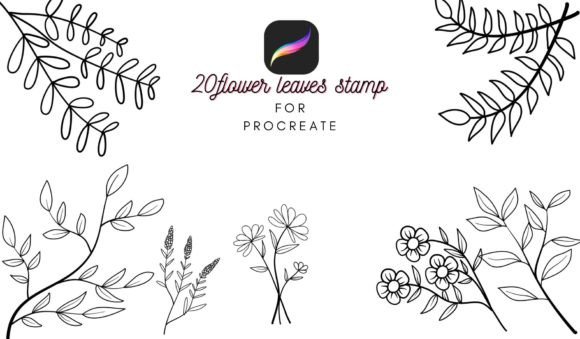
Before diving into techniques, it is vital to understand what this product actually is. The Doodle Stamp 20 Flowers and Leaves is not a standard painting brush that reacts to pressure with varying opacity in the traditional sense. Instead, it is a stamp brush set. Each stroke places a pre-designed element—such as a daisy, a fern, or a vine—onto your canvas. These are optimized for Procreate app version 5.0 and above. Using an outdated version of the software may result in compatibility issues, such as missing textures or incorrect scaling behaviors.
The aesthetic is specifically "nursery" style, implying soft lines, organic shapes, and a hand-drawn charm. This makes the set ideal for:
- Creating seamless patterns for textiles or wallpaper.
- Designing greeting cards and invitations.
- Adding decorative elements to digital planners.
- Enhancing educational materials for children.
Recognizing the specific style helps you determine if this asset fits your current project. If you are aiming for hyper-realistic botanical illustrations, this doodle style may not be the right fit. However, for whimsical, approachable, and friendly designs, it is an excellent resource.
Common Licensing Misunderstandings
One of the most frequent mistakes creators make involves intellectual property rights. The license for this brush set allows for personal use, educational use, and small business commercial use. However, there is a crucial caveat: the assets must be changed and integrated into your own creation.
A common error is selling the stamps as-is. For example, printing the flower stamps on a mug and selling the mug without any additional design elements or modifications can sometimes tread a fine line, depending on the specific platform's rules, but selling the digital brush file itself is strictly prohibited. You cannot redistribute the .brushset file or sell the individual stamp images as standalone clipart packs.
Why this matters: Violating these terms can lead to your work being removed from marketplaces, account bans, or legal cease-and-desist letters. It undermines the hard work and time the original artist invested in creating the image.
Better Approach: Always combine multiple stamps, add text, change colors, or overlay textures. Create a unique composition where the stamps are components of a larger whole, rather than the sole product. This respects the creator’s rights while adding your unique value.
Technical Pitfalls in Procreate
Even with the correct license, technical misuse can ruin your final output. Here are common technical errors and how to avoid them.
Ignoring Resolution and DPI Settings
Many beginners create their canvases at default settings, which are often too low for print. If you plan to use your Doodle Stamp 20 Flowers and Leaves designs for physical products like posters or fabric, you must ensure your canvas is set to at least 300 DPI (dots per inch).
The Consequence: If you design at 72 DPI (standard for screens) and then try to print, the edges of your stamped flowers will appear pixelated and blurry. This drastically reduces the perceived quality of your work.
The Fix: Before placing your first stamp, check your canvas settings. For print-ready projects, start with a high-resolution canvas. If you have already started designing, be aware that increasing the DPI after the fact does not magically restore lost quality. Plan ahead.
Misusing the Transform Tool
Stamp brushes are raster-based images. A frequent mistake is scaling a single stamp up significantly beyond its original size.
The Consequence: Enlarging a small stamp too much will reveal the pixel grid, making the delicate lines of the doodle look jagged and amateurish. This is particularly noticeable in the "nursery" style, which relies on smooth, gentle curves.
The Fix: Use the stamps at or near their native size. If you need a larger flower, do not stretch a small one. Instead, look for a larger variant within the 20-stamp set, or create a cluster of smaller flowers to form a larger visual mass. This maintains crisp edges and professional quality.
Design Mistakes That Reduce Impact
Beyond technical specs, artistic choices play a huge role in the success of your project.
Lack of Variation
Because these are stamps, it is tempting to place them in uniform rows or grids. This creates a rigid, mechanical look that contradicts the organic nature of flowers and leaves.
Better Approach: Embrace randomness. Rotate each stamp slightly. Vary the opacity to create depth, making some flowers appear in the background and others in the foreground. Use the color palette to introduce subtle variations—no two real flowers are exactly the same shade of green or pink. This mimics natural growth and makes the design feel hand-crafted rather than computer-generated.
Overcrowding the Composition
With twenty different elements available, there is a temptation to use all of them in one space. This leads to visual clutter, where the eye does not know where to rest.
Better Approach: Practice restraint. Use negative space effectively. Let some areas of your canvas breathe. Choose a focal point and arrange the stamps to guide the viewer’s eye toward it, rather than covering every inch of the background. Less is often more when working with detailed doodle styles.
Pre-Purchase and Pre-Use Checklist
Before you download or begin using the Doodle Stamp 20 Flowers and Leaves, run through this quick checklist to ensure a smooth experience:
- Verify Software Version: Ensure your iPad is running Procreate 5.0 or later. Older versions may not support the brush engine features used in this set.
- Define Your End Goal: Are you creating digital-only content (social media, web) or print products? This determines your canvas setup.
- Review License Terms: Confirm that your intended use falls under personal, educational, or small business commercial guidelines. Remember, integration and modification are key for commercial use.
- Test Scale: Open a test canvas and place each of the 20 stamps. Note their default sizes and how they respond to rotation. This saves time during actual projects.
Maximizing Efficiency in Your Workflow
To get the most out of this tool, consider organizing your layers. Keep your stamp elements on separate layers from your background and text. This allows you to adjust the position, color, or opacity of individual flowers without affecting the rest of the design. Grouping related elements (e.g., all leaves in one folder, all flowers in another) can also streamline the editing process.
Additionally, experiment with blending modes. Setting a stamp layer to "Multiply" can help it blend more naturally with textured backgrounds, while "Overlay" can add a subtle tint that matches your color scheme. These small adjustments elevate the final piece from a simple collage to a cohesive illustration.
In conclusion, the Doodle Stamp 20 Flowers and Leaves is a powerful asset for Procreate users who value efficiency and charm. By respecting the licensing terms, adhering to technical best practices, and applying thoughtful design principles, you can avoid common pitfalls and create stunning, professional-quality work. Always remember that tools are only as good as the care and creativity applied to them. Respect the creator’s effort by using the assets responsibly, and enjoy the process of bringing your digital gardens to life.