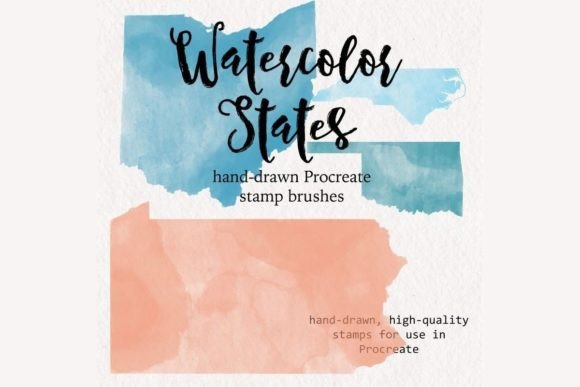
Mastering Procreate Watercolor United States Brush Stamps for Digital Art
Digital illustration has evolved rapidly, offering tools that mimic traditional media with surprising accuracy. Among these, watercolor remains a favorite for its organic, fluid aesthetic. For artists focusing on geographic themes, travel journals, or regional branding, the Procreate Watercolor United States Brush Stamps offer a specialized solution. This collection includes fifty unique stamps, one for each state, designed to replicate the look of hand-painted watercolor maps. However, simply purchasing a brush set does not guarantee professional results. Many users overlook critical technical and artistic considerations, leading to frustration or subpar artwork. Understanding how to properly integrate these assets into your workflow is essential for maximizing their value.
Understanding the Asset Before You Buy
Before diving into creation, it is vital to clarify what this product actually is. The Procreate Watercolor United States Brush Stamps are not physical items. Nothing will be mailed to you. Instead, you receive a digital file in .brushset format. This distinction matters because it requires specific software compatibility. You must have the Procreate app installed on an iPad to use these brushes. Attempting to open these files on Photoshop, Procreate Pocket, or desktop applications without conversion will result in errors.
Furthermore, these are not generic shapes. Each of the fifty states is uniquely painted, featuring distinct watercolor characteristics such as painterly blooms, dried edges, and varied saturation. They are arranged alphabetically, starting with Alabama, to ensure easy identification. This level of detail allows for high-quality illustrations suitable for road trip logs, cross-country artwork, or "love where you live" decor. Recognizing that these are pre-rendered stamps rather than dynamic brushes that paint from scratch helps set realistic expectations for customization.
Common Mistakes and How to Avoid Them
Even experienced digital artists can stumble when using stamp-based assets. Here are frequent pitfalls and practical corrections to ensure your work remains polished and professional.
Ignoring Layer Management and Blending Modes
A common error is placing watercolor stamps directly onto a white background without adjusting blending modes. Watercolor relies on transparency and layering to achieve depth. If you keep the layer mode on "Normal," the colors may appear flat and opaque, losing the characteristic fluidity of watercolor.
The Better Approach: Always experiment with blending modes such as Multiply or Linear Burn. These modes allow the textures of underlying layers to show through, mimicking how real watercolor pigment settles into paper fibers. Additionally, organize your layers by region or color palette. Grouping states by geographical region or color scheme keeps your project file manageable, especially when working on complex cross-country illustrations.
Overlooking Color Customization
Many users assume they are stuck with the default colors provided in the stamp. While the initial hues are carefully chosen, relying solely on them can make your artwork look generic or inconsistent with your brand palette. A map of the United States using fifty different, uncoordinated shades can appear chaotic rather than cohesive.
The Better Approach: Utilize Procreate’s hue, saturation, and brightness adjustments. Since these are high-quality stamps, they respond well to color shifts. Select a unified color story—such as earthy tones for a rustic feel or pastels for a soft, dreamy aesthetic—and adjust each state accordingly. This ensures visual harmony across the entire composition. Remember, the ease of modifying size, position, and color is a key feature of this set; leverage it to maintain consistency.
Neglecting Installation Instructions
Technical issues often arise from skipping the included installation guide. The set comes with a PDF containing written instructions in English. Ignoring this document can lead to improper installation, where brushes may not appear in the correct folder or may fail to load entirely. This wastes time and creates unnecessary stress.
The Better Approach: Download the PDF and follow the steps precisely. Typically, this involves tapping the .brushset file on your iPad and selecting "Open in Procreate." Verify that all fifty states are present and labeled correctly before starting a project. Checking the alphabetical order, from Alabama to Wyoming, ensures no data was corrupted during download.
Maximizing Efficiency and Quality
To get the most out of your Procreate Watercolor United States Brush Stamps, consider the context in which you are creating. Are you designing for social media, print, or personal journaling? Each medium has different requirements.
- Social Media: When illustrating for Instagram or other platforms, focus on bold contrasts and clear shapes. The distinct watercolor designs, with their painterly blooms, stand out well on small screens. Ensure your canvas size is optimized for mobile viewing, typically 1080x1080 pixels or 1080x1350 pixels.
- Print and Home Decor: For artwork intended for framing or sale, resolution is critical. Create your canvas at 300 DPI to ensure crisp edges. The high-quality nature of these stamps supports large-scale printing, but only if the initial setup is correct. Use the ease of modification to arrange states in creative compositions, such as heart shapes or regional clusters.
- Educational and Business Use: Educators and small business owners can use these stamps for presentations or marketing materials. The ability to quickly insert accurate state shapes saves hours of manual drawing. However, always double-check geographical accuracy if the illustration serves an educational purpose. While the stamps are visually appealing, they are artistic interpretations, not precise cartographic tools.
Evaluating Your Needs Before Purchase
Not every artist needs a full set of fifty state stamps. Before buying, assess your typical projects. If you frequently illustrate travel routes, create content for multiple US regions, or produce merchandise featuring state outlines, this set is invaluable. It eliminates the need to draw each state manually, ensuring consistent style and saving significant time.
However, if your work rarely involves US geography, or if you prefer highly customized, non-watercolor styles, this asset may sit unused. Consider whether the specific aesthetic—hand-drawn, watercolor with dried edges—aligns with your brand. The uniqueness of each state’s design is a selling point, but it also means you cannot easily change the fundamental texture of the stamp. You can change color and size, but the watercolor bloom pattern remains fixed.
Additionally, verify your device compatibility. Ensure your iPad model supports the version of Procreate required for these brushes. Older devices may struggle with large brush sets or high-resolution canvases, affecting performance. A smooth workflow depends on hardware that can handle the digital load.
Final Thoughts on Digital Watercolor Assets
The Procreate Watercolor United States Brush Stamps represent a powerful tool for digital artists seeking efficiency without sacrificing artistic integrity. By understanding the technical requirements, avoiding common blending and color mistakes, and aligning the asset with your specific creative goals, you can produce stunning, professional-grade illustrations. Whether you are documenting a cross-country road trip or designing home decor, these brushes offer a blend of convenience and quality. Take the time to learn the installation process, experiment with blending modes, and customize colors to fit your vision. With careful application, this collection can become a staple in your digital art toolkit, enhancing both your productivity and your creative output.